![B Unit Logo (1).png]](https://testi.zeelandfamily.fi/hs-fs/hubfs/B%20Unit%20Logo%20(1).png?height=40&name=B%20Unit%20Logo%20(1).png)
Operator User
Operator level users are essentially your standard web portal user type. They sit one level under the administrator and have access to the majority of the system, minus a few specific admin tools.

Available Sections & Functions:
- Full dashboard
- Network section
- Charging sites: Creating, editing & reporting
- Chargers: Editing, actions & reporting
- Access Control: Full view, creating, editing & reporting
- Billing section
- Tariffs: Creating & editing
- Charger revenue: Full view & reporting
- Charging log: Full view & reporting
- Drivers section
- All drivers / vehicles: Creating, editing and reporting
- Groups of drivers: Creating & editing
- RFID cards: Creating, editing & reporting
- Maintenance section
- Issues: Creating, editing & reporting
- Organisation section
- Organisation details: General, support, billing & settings tabs
- Users: Creating & reporting
- User notifications: Creating & removing
- Support section
- Knowledgebase
- Telephone
- Account section
- Sign out
Hidden Sections & Functions:
- Network section
- Charging sites: Migrate site
- Organisation section
- Organisation details: Admin tab
- Admin tools section
Support User
Support users represent a more specialised role. These would typically be employees that need a reasonable amount of visibility of the system to do their job, but who shouldn't have access to critical functionality, such as creating or deleting sites and chargers.

Available Sections & Functions:
- Simplified dashboard
- Network section
- Charging sites: Read only
- Chargers: Read only except for actions menu
- Access Control: Reduced view
- Charging log: Read only
- Drivers section
- All drivers / vehicles: Read only
- Groups of drivers: Read only
- RFID cards: Read only
- Maintenance section
- Issues: Creating, editing & reporting
- Support section
- Knowledgebase
- Telephone
- Account section
- Sign out
Hidden Sections & Functions:
- Billing section
- Organisation section
- Admin tools section
Maintenance User
Maintenance users are another specialised role with reduced visibility and functionality. These users would typically be for third parties that need access to the system such as engineers. This ensures a better level of security when working with people outside of your organisation, without compromising on their ability to interface with the system.
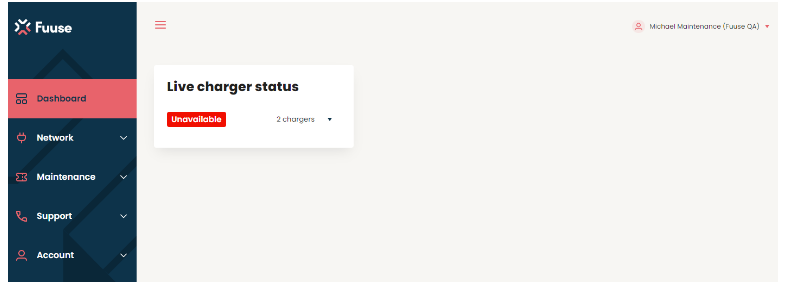
Available Sections & Functions:
- Simplified dashboard
- Network section
- Charging sites: Read only
- Chargers: Read only except for actions menu
- Maintenance section
- Issues: Creating, editing & reporting
- Support section
- Knowledge base
- Telephone
- Account section
- Sign out
Hidden Sections & Functions:
- Network section
- Access Control
- Billing section
- Charging log
- Drivers section
- Organisation section
- Admin tools section